Case study · product design & front-end
FITFLOW AI: the follow-up engine for fitness coaches
An interactive SaaS prototype for independent fitness coaches, built around one job: never letting an interested lead or a slipping client go quiet. A Today queue says who to message and why, sequences schedule every next step and pause on reply, and every draft shows its reasoning.
- Role
- Product owner & design lead
- Scope
- Landing page, 9-screen app, follow-up engine
- Stack
- Figma, Next.js, TypeScript, Tailwind, GSAP, Motion
- Type
- Portfolio prototype with sample data
My role
I picked the problem and the users: fitness coaches who sell coaching online. A lot of them run their whole business from Instagram DMs, WhatsApp and spreadsheets, so leads and follow-ups get lost. I decided what FITFLOW should do and what it shouldn't: no payments, no real data, everything clearly marked as sample, and the AI only writes drafts, it never sends anything on its own.
I reviewed every version of the design. When the first version looked too much like an AI-made template, I pushed it toward a cleaner, Figma-based product design, added light and dark mode, and asked for proper scroll animations with GSAP.
I built it with Claude Code, an AI coding agent. I gave the direction and checked every step; the agent wrote most of the code, the Figma file and the tests. Ask me about any decision on this page and I'll walk you through it.
01
The problem
Many fitness coaches build an audience on Instagram or YouTube long before they build a business. Enquiries arrive as DMs, WhatsApp messages and comments; offers are explained one conversation at a time (“DM me for price”); follow-ups live in memory; and there is little visibility into which channel or program actually produces clients.
Generic CRMs and website builders cover pieces of this, but they are built for sales teams or online stores, not for one person selling a 12-week coaching program from their phone.
Honesty note: the problem framing comes from desk research and common coach workflows. I did not run user interviews or usability tests for this prototype, so the points below are design hypotheses, not validated findings.
02
Target user (proto-persona)
Aarav, 31, strength coach (fictional)
Jobs to be done
- • Explain what I offer and what it costs, clearly
- • Never let an interested person go cold
- • Know who to message and coach today
- • See which content and programs bring clients
03
Value proposition & product scope
“Every lead followed up. Every client kept.” FITFLOW runs one loop: capture every enquiry in a pipeline, prioritise who to message today, follow up with drafts that explain themselves, and retain clients with check-ins and a rescue sequence. Offers, bookings and analytics stay, as support for that loop.
Version 2 refocus. The first version was a broad “business OS” with a storefront builder and two public coach pages. It overlapped with another project of mine, a creator storefront, and tried to do too much. Version 2 cut the storefront and rebuilt the product around the moment coaches actually lose clients: the follow-up.
04
Key flows
- 1
Work through today
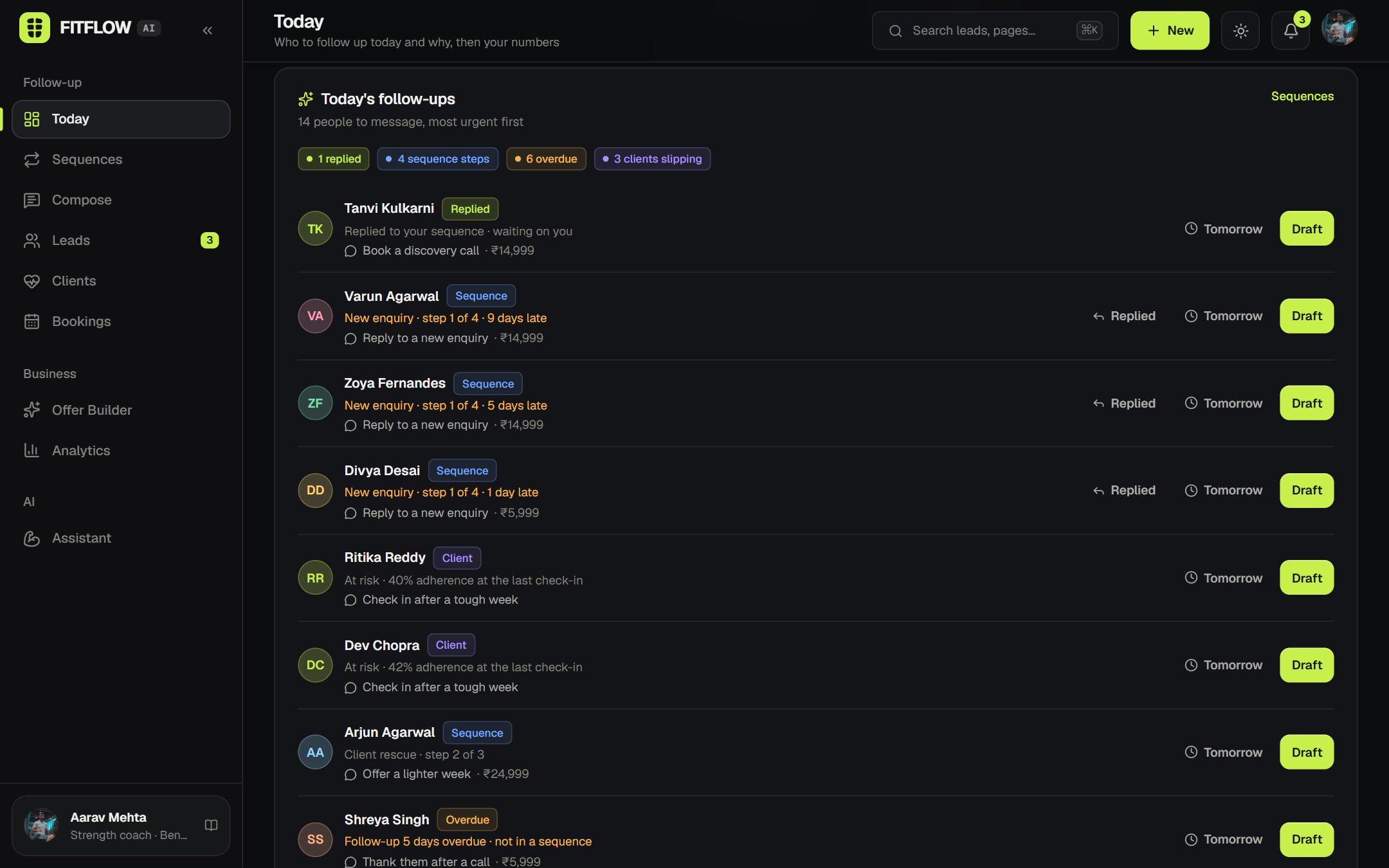
Today → top task (a due sequence step) → Draft → read “Why this draft” and the checks → edit → send from WhatsApp → “I sent it: log step” → next step scheduled, back to Today.
- 2
A lead replies
Today → “Replied” on their row → sequence paused → they move to the top as “waiting on you” → personal reply → book a discovery call.
- 3
Enquiry to client
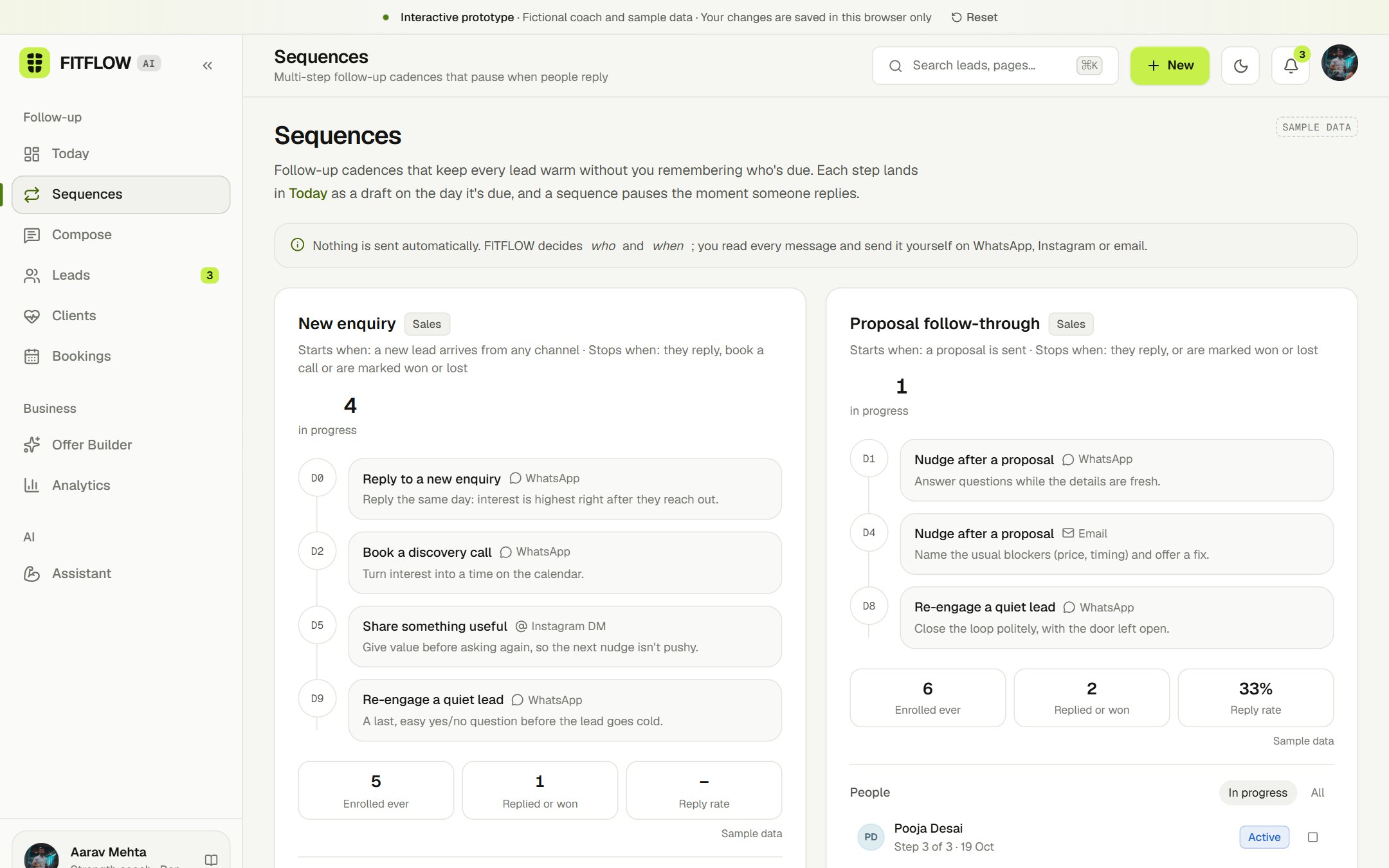
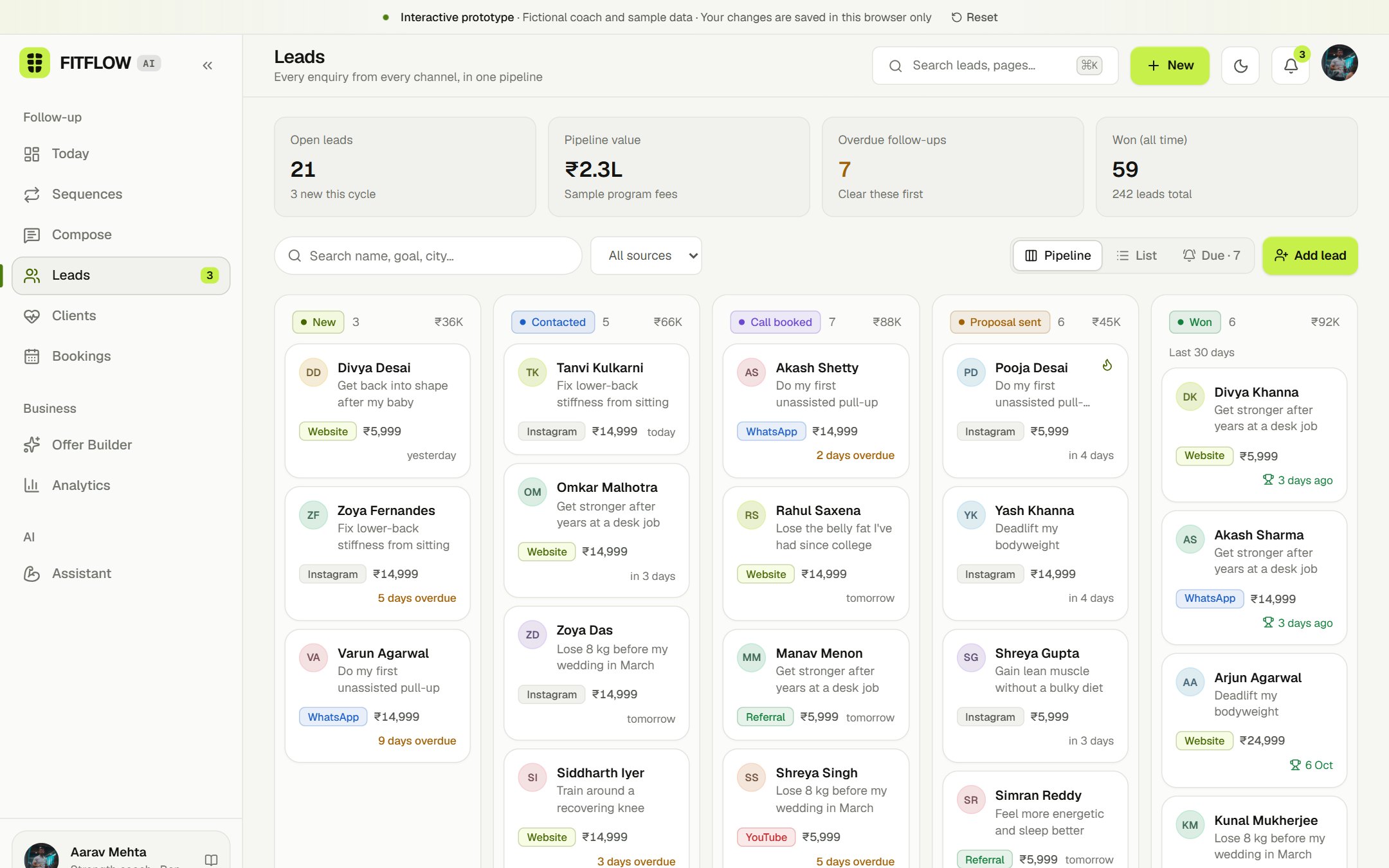
New lead → added to the New enquiry sequence → four steps over nine days, paused on reply → discovery call → proposal sequence → Won → client profile created.
- 4
Rescue a slipping client
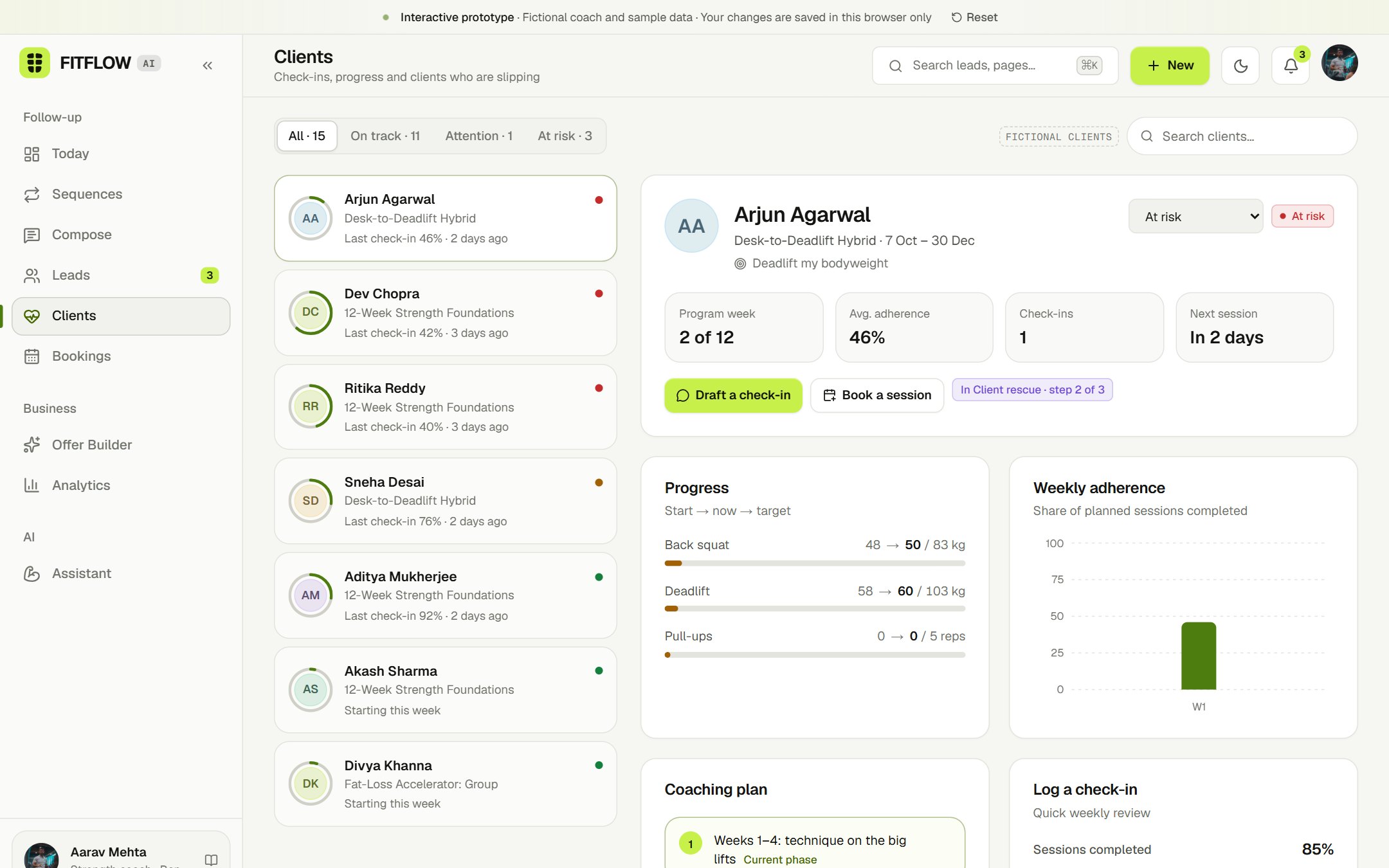
Check-in logs low adherence → status turns at-risk → appears in Today → draft a check-in or start Client rescue → lighter week → reset call.
- 5
Answer a business question
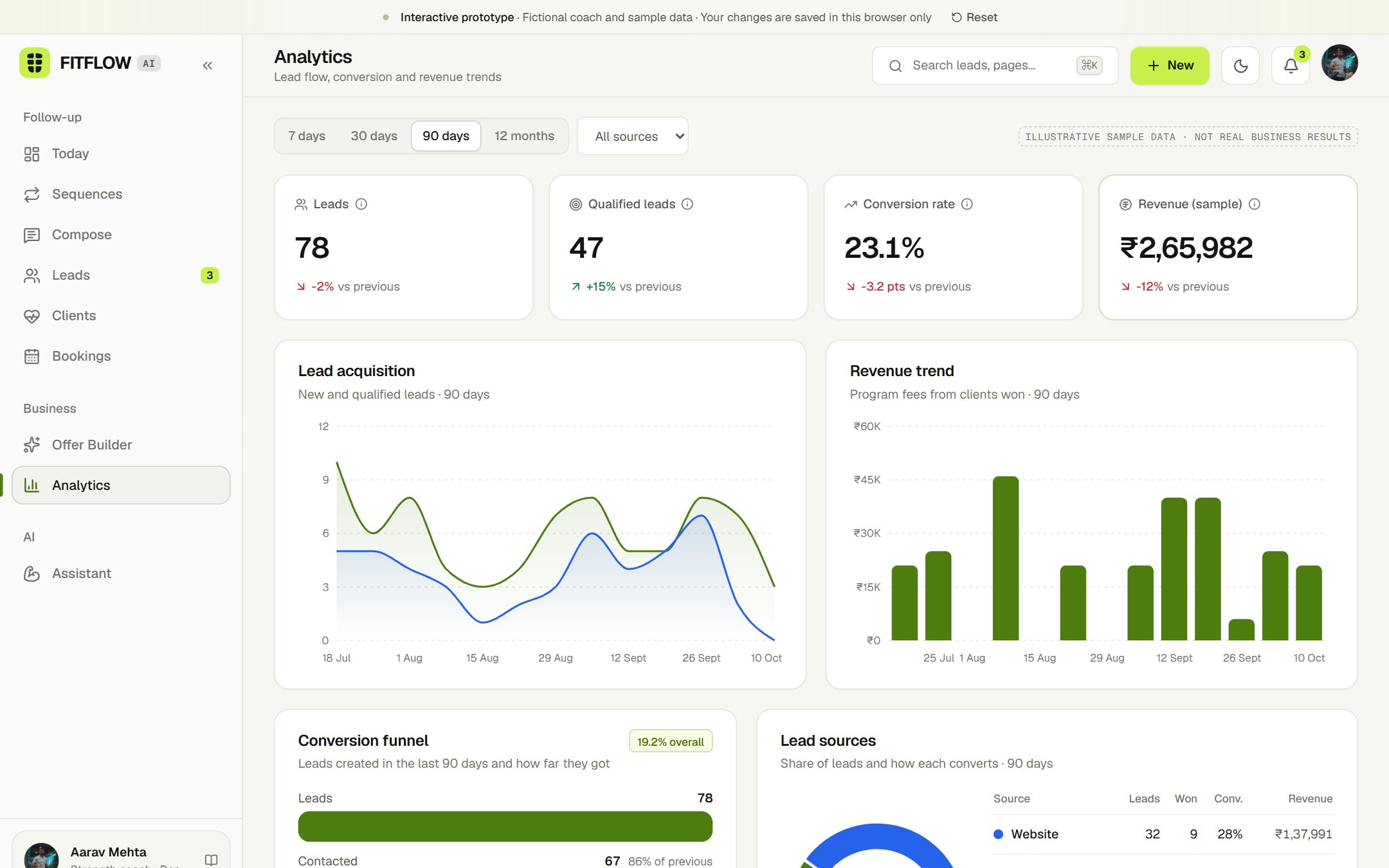
Assistant → “Which lead source is performing best?” → answer computed from the same data → link to filtered analytics.
05
Screens
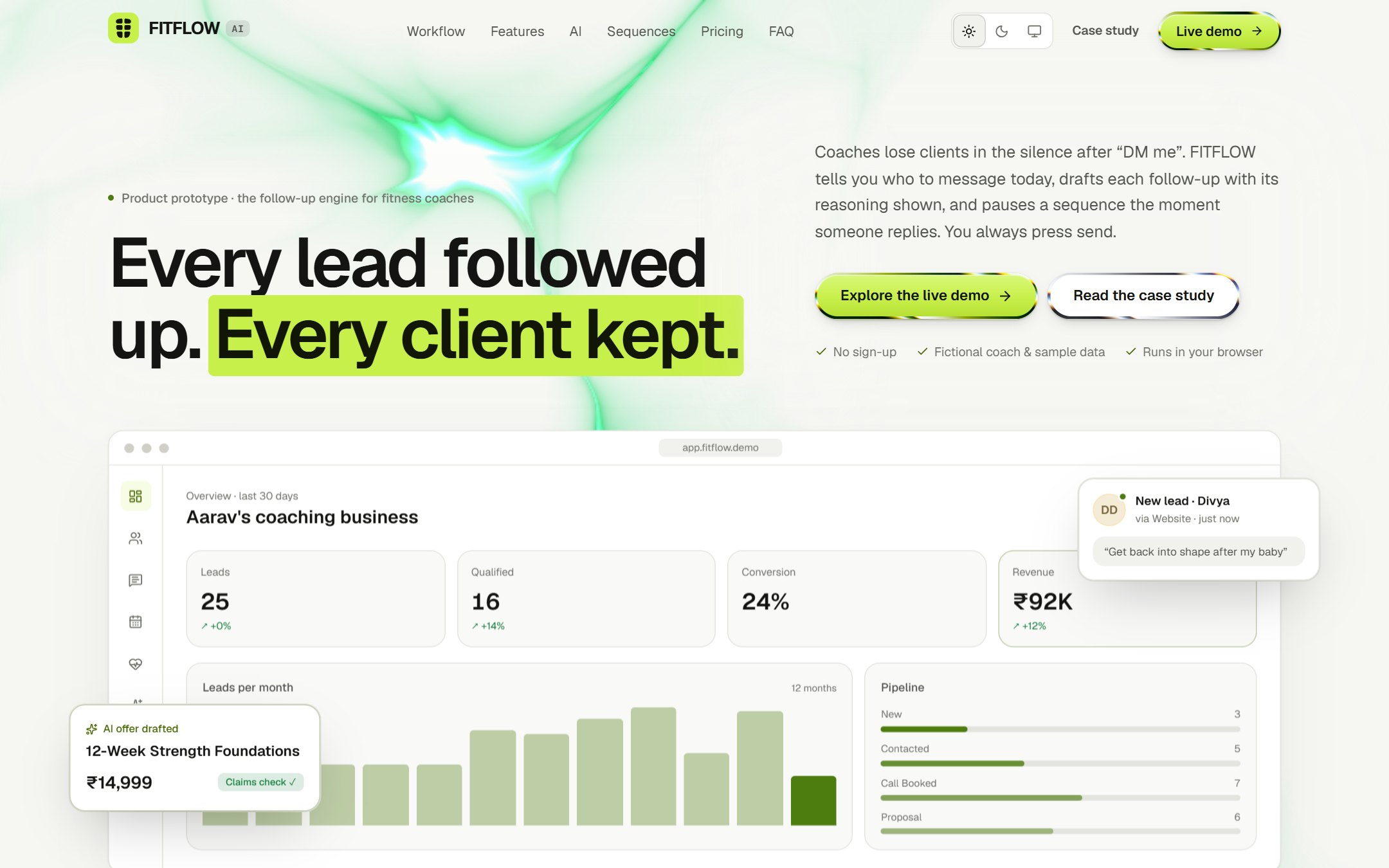
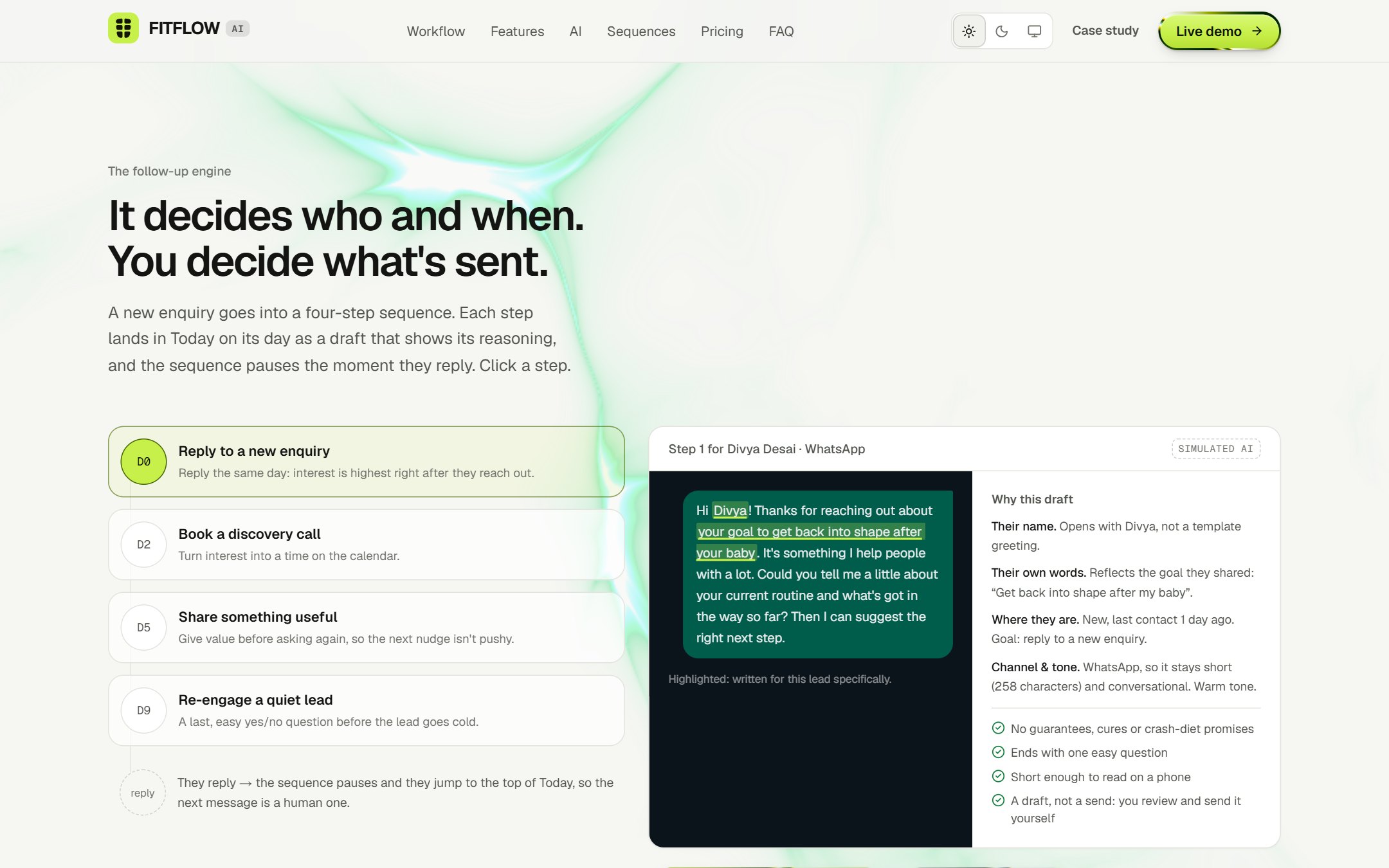
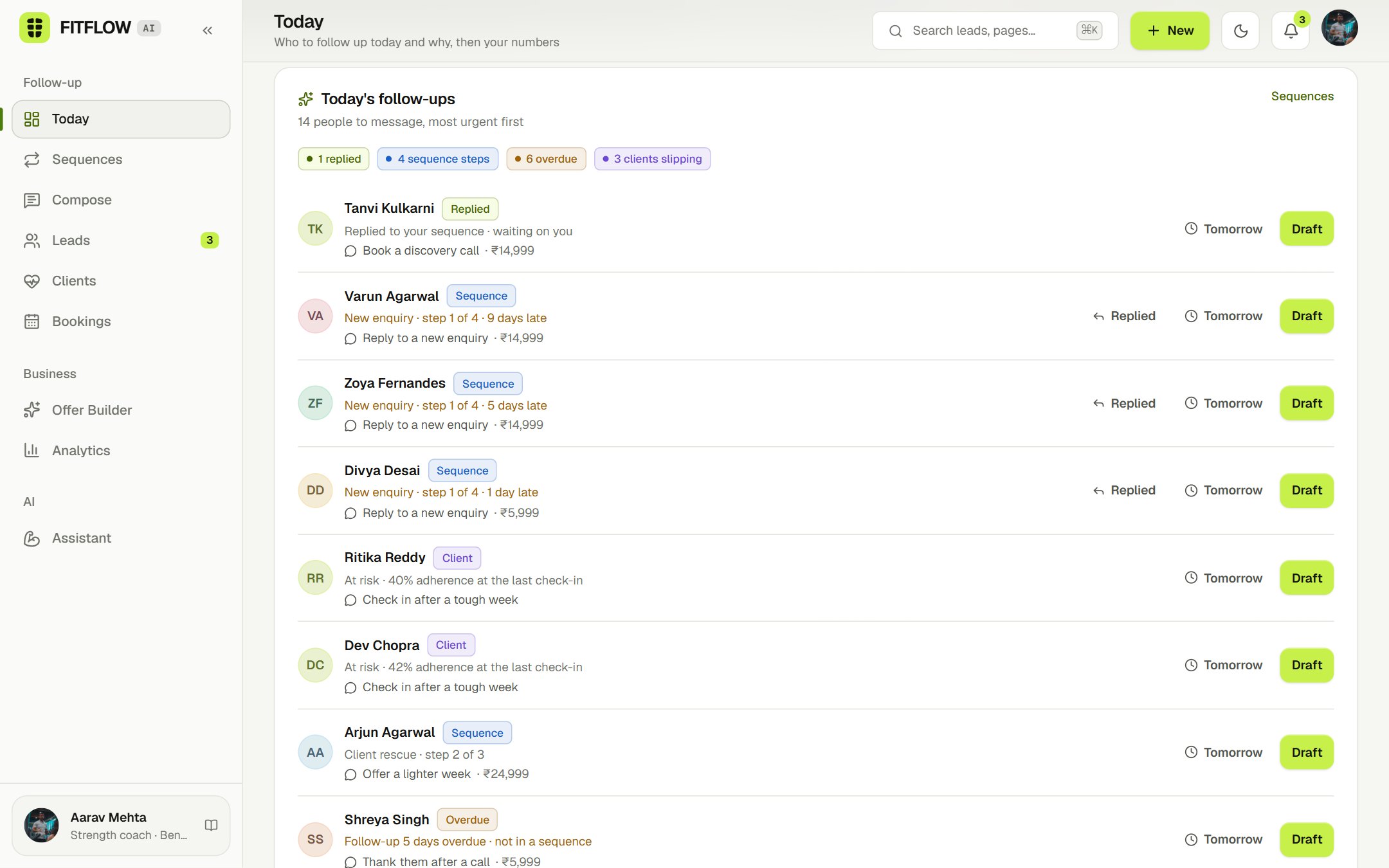
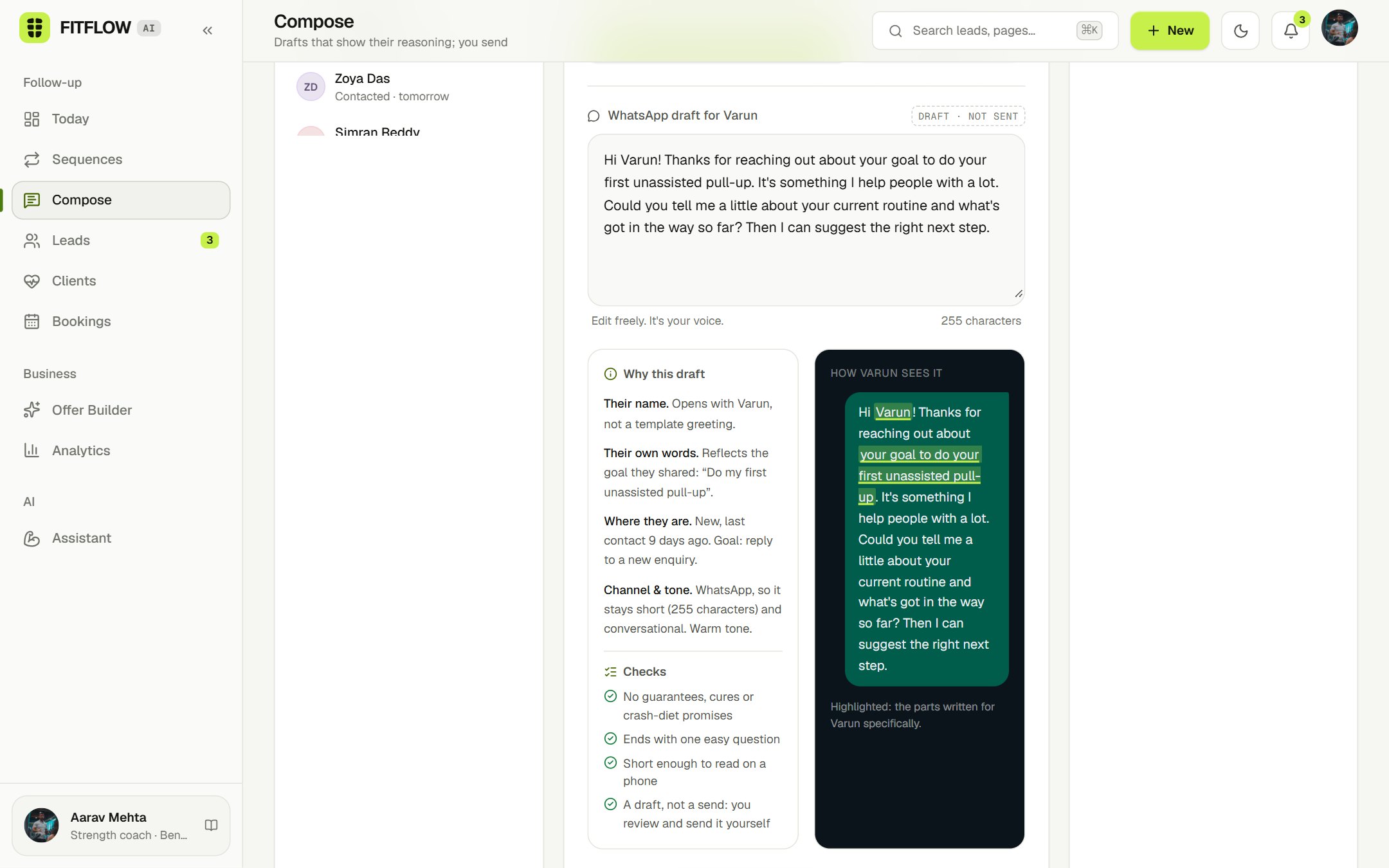
06
Design decisions
A queue, not a dashboard
It decides who and when; you decide what's sent
Drafts that show their reasoning
A reply beats any schedule
Retention is follow-up too
Numbers you can trust
07
UX problems addressed
Follow-ups get forgotten
Today ranks who's due; sequences schedule every next step so nothing relies on memory
Replies get buried under scheduled messages
Mark a reply and the sequence pauses; they jump to the top of Today
Templates sound like templates
Drafts built from the lead's own words and stage, with the personal parts highlighted
Not knowing if a draft is safe to send
Visible checks for guarantees, medical claims, length and a clear question
Leads scattered across DMs and spreadsheets
One pipeline with a source, stage and sequence on every lead
Clients quietly dropping off
Check-ins compute a status; slipping clients get a rescue sequence
08
Design system
Warm-neutral surfaces in light mode, charcoal in dark, hairline borders, a three-step text hierarchy and one lime accent kept for primary actions and selection. Every colour is a token with a Light and a Dark value, so a theme switch is a token swap.
bg
#F6F6F3 / #0A0B0D
panel
#FFFFFF / #121417
panel-2
#F1F1ED / #1A1C20
line
#E4E4DE / #25282D
fg
#141512 / #F2F3EE
lime
#C8F04A / #C8F04A
Type
Geist
Everything from display to captions, with tabular numbers.
Geist Mono
Code-like labels.
Fraunces
Kept for editorial accents.
Components
Motion
09
Figma file
The design system and key screens live in a Figma file that mirrors the code: colour variables with Light and Dark values (bound to every fill and stroke), a text-style ramp, spacing and radius variables, elevation styles, components with variants (Button, Badge, Text field, Nav item, Stat tile, Lead card) and screens built from those components in both themes.
Open the Figma file10
Build
Next.js App Router with TypeScript and Tailwind. All state lives in a small Zustand store persisted to localStorage, seeded by a deterministic generator (twelve months of leads, clients and bookings, dated relative to today). Analytics and the follow-up engine (sequences, the Today queue, draft explanations) are pure functions shared across screens and covered by 17 unit tests; 13 end-to-end flows run in headless Chrome. AI features are deterministic templates over that data, so the demo runs offline at no cost. Charts use Recharts. Motion handles UI micro-interactions and GSAP (ScrollTrigger, SplitText) the scroll choreography. The theme is applied before first paint and switches instantly.
11
Limitations
- No backend: no accounts, real data, email or payments. Everything is fictional and stays in the browser.
- AI is simulated with templates. A production version would call a language model with the same guardrails and structured outputs.
- No user research or usability testing yet. All problem statements, personas and the follow-up focus are hypotheses.
- Reply rates and other sequence numbers come from generated sample data, not real outcomes.
- Nothing is sent: coaches copy each draft into their own app. A production version would need WhatsApp Business and Instagram integrations, with consent and opt-out handling.
- Pricing is a concept for packaging, not a validated price point.
- Drag-and-drop on the pipeline uses native HTML drag events (desktop). On touch devices, stages are changed from the lead panel.
- Photos are Unsplash images; the people pictured are not the fictional coaches.
12
What I'd validate next
- 1. Five interviews with coaches who sell online, focused on how enquiries and follow-ups are handled today.
- 2. A task-based test of Today on a phone: can a coach clear five follow-ups in under five minutes, and do they trust the drafts enough to send them?
- 3. Does “Why this draft” change behaviour? Compare edits and send rates with and without the explanation panel.
- 4. Willingness-to-pay conversations before committing to the pricing concept.
See it for yourself
Every screen above is live and clickable.